Fundraising games for every occasion.
Donation games are an exciting way to raise money for your cause. GivingBlox makes it easy to setup and manage multiple different types of games depending on your objective. Completely web based, works on any device, and no app needed. Best of all, it's FREE!
Sign up Free Now!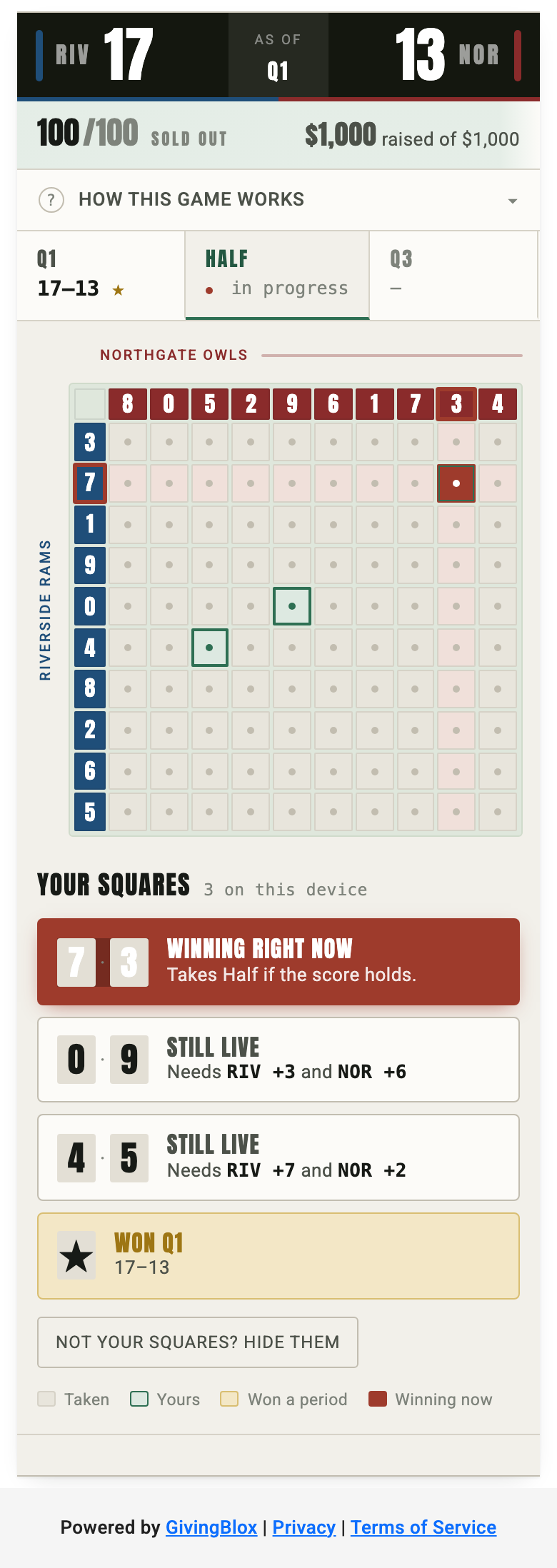
Fundraising Game: Football Squares
New! The 100-square board everyone already knows how to play, rebuilt as a fundraiser. Donors buy squares before kickoff to support your cause. When you close sales, each axis is assigned a random ordering of the digits 0 through 9 — which means while squares are on sale, every open square is exactly as good as every other one. Nobody can cherry-pick a better square.
- Set up a 10x10 board of 100 squares at one flat price per square. Every square costs the same. 100 squares at $10 each is a $1,000 fundraiser.
- Type in both team names and pick a color for each. No league data or logos needed, so it works for high school, college, pro, or a company league.
- Choose which periods pay out — Q1, Half, Q3, and Final by default — and declare a fixed amount for each, or run the board recognition-only with no prize at all.
- Publish the game and share the link with donors.
- Donors buy one or more squares from their phone, and can be listed as "First L." or Anonymous.
- Digits are randomly assigned after sales close, so every open square starts out equally likely to win.
- Donors see their own squares highlighted on the board plus a live status list — "winning right now", "still live", or "won Q1" — with no account required.
- You enter the score for each period, and the board reveals that period's result when you do. There is no live score feed.
- Unsold squares belong to the organizer, so you can run the board without filling the grid first.
- Optional extras: a sponsor slot, a header image, reverse squares, and a per-period re-draw. The last two are off by default.
- Works for any scored game with periods — basketball, baseball, and hockey as well as football.
-
Ideas: Use this game
for
- Booster clubs and youth sports teams through football season.
- Homecoming, rivalry week, or the championship game in early February.
- Company leagues and alumni groups, using free-text team names.
The organizer sets and awards any prizes directly. GivingBlox does not hold, manage, or pay out prize money, and the organizer is solely responsible for compliance with all applicable charitable-gaming, raffle, tax and licensing laws.
Watch Demo Learn More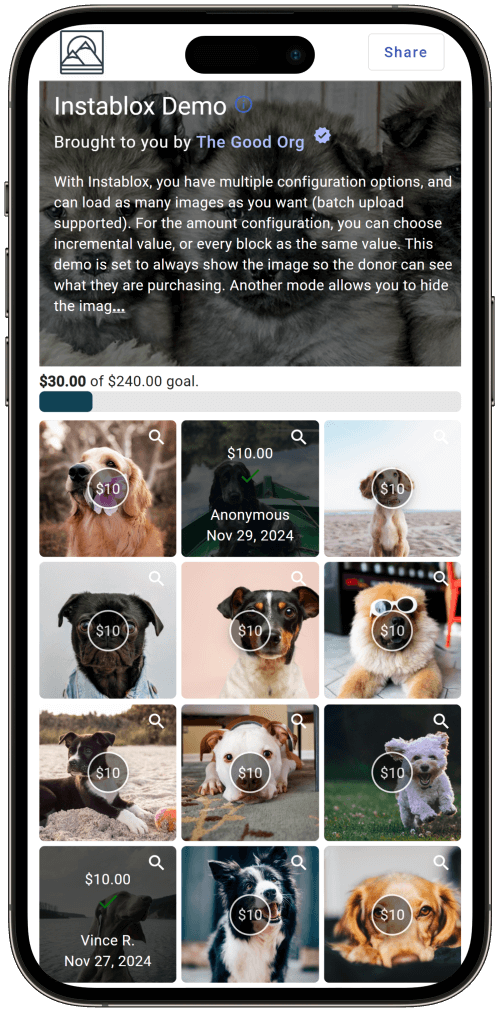
Fundraising Game: InstaBlox
Choose the number of blocks and the incremental value. Your donors can purchase one or more blocks. The goal is to "sell" them all. Donors can optionally have their name listed on purchased blocks!
- Upload images, which are cropped to square if not so already. Images can be sequenced and moved around into any order.
- Set the amount per image, and whether or not it is a flat amount, or incremental amount.
- Choose whether or not images are always displayed, or only after purchase (surprise mode).
- Publish the game and send link to donors.
- Donors can purchase one or more blocks and optionally have their name listed on purchased blocks.
- There is an exciting finish at the end when all blocks are purchased!
-
Ideas: Use this game
for
- Campaigns involving sponsoring or claiming a specific person, animal, or item.
- Surprise mode where donor wins a specific prize or item, and only finds out once donation is received.
Fundraising Game: Cause Collage
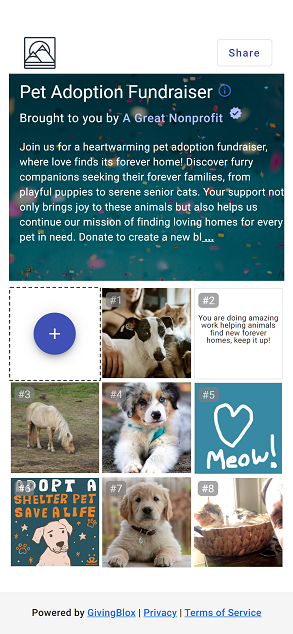
Now Available! Turn your fundraising campaign into a work of art that combines the unique creations of your donors. A donor purchases a block, and then makes it their own with the interactive canvas. They can select a free stock image or GIF/meme, write a message, draw on a canvas free-form, or even upload a short video clip. The final collage is a unique creation that is a reflection of your cause and your donors.
- Setup your fundraising game by selecting a minimum donation amount.
- Publish the game and send link to donors.
- Donors can view the current collage, as well as contribute their own block via donation.
-
Collage block types
include:
- Choosing a stock image or GIF/meme.
- A written message.
- Freeform drawing on a canvas.
- Uploading a short video clip or picture.
- Upon donation completion, the block is added to the collage.
- Administrators have full moderation control to hide blocks if they do not meet your standards.
- The game is complete whenever you decide to end it, but the collage will live on forever.
Fundraising Game: The Great Reveal
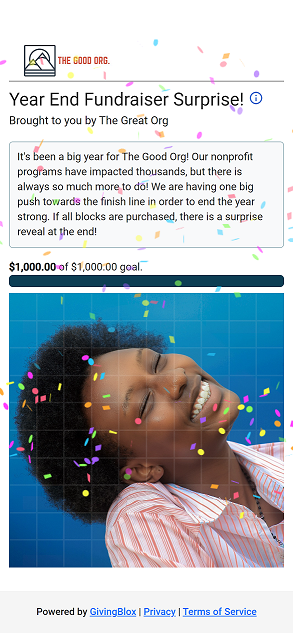
Upload any image, and select the number of blocks and the block value to be contained within the image. Donors can buy one or more blocks to slowly reveal the image. The Great Reveal occurs once every block is purchased!
- Upload any image. It can be a photo, QR code, or anything else.
- Set the number of blocks, and amount per block to establish your fundraiser goal.
- Publish the game and send link to donors.
- Donors can purchase one or more blocks to slowly reveal the image.
- Once the final block is purchased, the image is revealed!
- Ideas: Use this game to reveal a surprise, like the gender of a new baby, the QR code to a secret message, or the design for your new nonprofit school or community center.
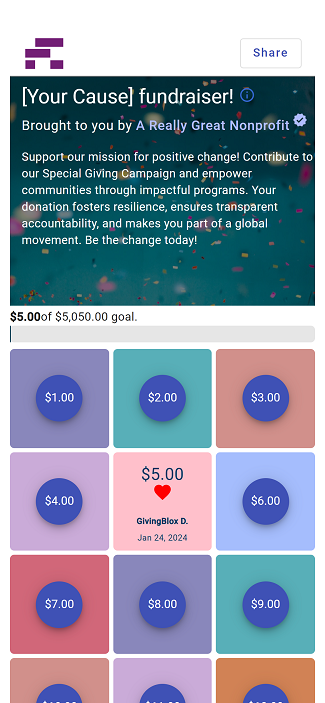
Fundraising Game: Giving Blocks
Choose the number of blocks and the incremental value. Your donors can purchase one or more blocks. The goal is to "sell" them all. Donors can optionally have their name listed on purchased blocks!
- Setup your donation game by selecting the number of blocks and the incremental value.
- Publish the game and send link to donors.
- Donors can purchase one or more blocks and optionally have their name listed on purchased blocks.
- There is an exciting finish at the end when all blocks are purchased!
- Ideas: Use this game for general fundraising, end of year fundraising, or any specific project or campaign.
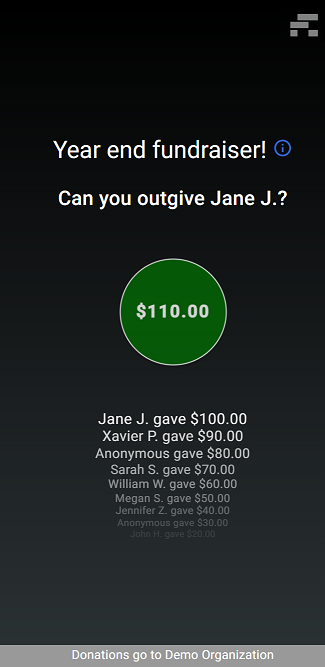
Fundraising Game: Outgive Me
Engage your donors in generous competitive giving! The goal is to "one-up" your peers by providing the next highest donation. The game keeps going until you decide it's time to close it down!
- Setup your fundraising game by selecting the increment value. This will define the first donation amount, and the increment for each subsequent donation.
- Publish the game and send link to donors.
- Donors can see the current amount and donate to become the highest donor! Their name makes the top of the list as previous donors are bumped down. Donors can choose to be listed anonymously.
- The game ends when you've maxed out donor generosity and you choose to finalize the game.
- Ideas: Use this game for competitive fundraising, whether raising for giving tuesday, specific campaigns, or individual fundraising for a school or mission trip.
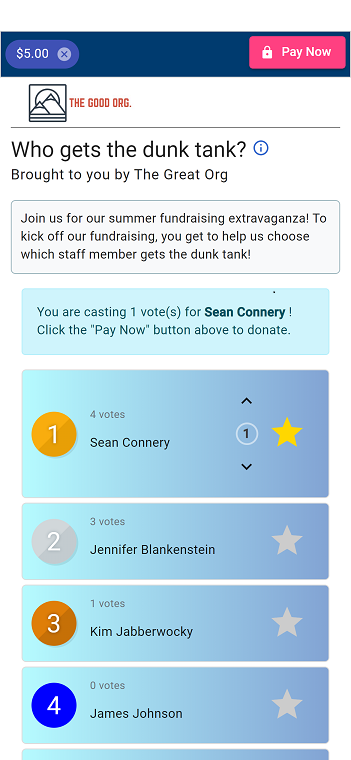
Fundraising Game: Perfect Poll
Vote with your donation! Configure candidates to vote on, the donation amount per vote, and then let your donors decide who wins!
- Setup your donation game by selecting vote cost amount, and the vote candidates.
- Publish the game and send link to donors.
- Donors can see the list of eligible candidates and vote for their favorite. They can even cast multiple votes!
- The game ends when you decide it's time to close voting.
- Ideas: Use this game to vote on gender reveals, a staff member to get the pie in the face, or which color to paint the new community center.
Fundraising Game: Scratch Card
Coming soon! A virtual scratch card game. Donors select one or more scratch items to reveal their donation amount.